5 Highly Rated Flipper Zero Accessories You Can Find On Amazon
January 11, 2026
Depending on whom you ask, the Flipper Zero is either a hacker mastermind’s weapon of mass digital destruction or a convenient, toy-like multi-tool for a great deal of totally legal things. While it’s true the Flipper Zero can be used to wreak a bit of havoc — and yes, it can unlock cars — it’s misleading to suggest that getting your hands on one will suddenly allow you to break into a high-security building “Mission: Impossible” style. The Flipper Zero is a wake-up call for the world, demonstrating that our security standards are not as strong as we thought they were. You can find countless use cases for it that don’t involve breaking the law; some people just slap a Raspberry Pi accessory on their Flipper Zero to make it a gaming console. More to the point, accessories give the Flipper Zero extra superpowers.
The Flipper Zero is hackable and customizable by design, including its hardware. If you’re new to the Flipper Zero or considering the device, the following are a few accessories that have strong reviews on Amazon. We try to stick to at least a 4-star average or above and a minimum of 100 reviews. Bear in mind that the Flipper Zero has been in the crosshairs of legislators; you can’t buy it directly from Amazon, and as a result there are fewer available accessories. Nonetheless, here are the best ones you should check out.
Wi-Fi devboard
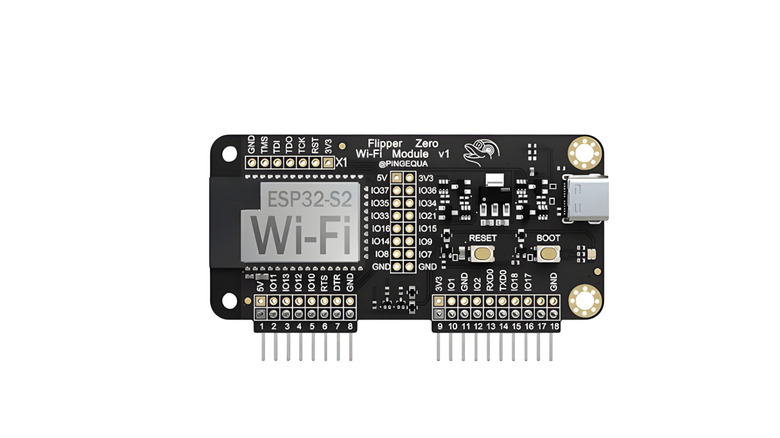
The bread and butter of this device is tackling frequencies all over the electromagnetic spectrum, allowing Flipper Zero to do a lot of unexpected things. But surprisingly, it doesn’t ship with Wi-Fi support. For that, you might try the Flipper Zero Wi-Fi devboard with pre-installed Marauder Firmware, an ESP32 microcontroller similar to Arduino’s smallest boards. You plug it into the top of the Flipper Zero via its GPIO pins, and away you go. The pre-installed Marauder firmware is a pen-testing (penetration testing, or white-hat hacking) suite of “offensive and defensive tools,” according to its Wiki.
So what does a Wi-Fi board like this enable you to do? Marauder’s own list is exhaustive: scanning Wi-Fi, monitoring packets, and some stuff — like the section on Wi-Fi attacks — that starts to get into legal gray areas. Some of these attacks are pretty inoffensive, like the Rickroll Beacon, which puts “Never Gonna Give You Up” in the device list when scanning for Wi-Fi; others, however, are definitely illegal, like the Evil Portal, which allows you to create a fake free Wi-Fi hotspot that routes someone to a phishing website to skim their credentials. Again, people do have some legitimate reasons to be concerned about the Flipper Zero, and it’s up to you to use it responsibly.
It would seem this Wi-Fi devboard is best suited for people who do a lot of Wi-Fi troubleshooting. The Marauder firmware might come in handy for diagnosing network issues, whether at home or at work. Do be aware that Flipper Zero sells its own official Wi-Fi devboard for $35.
TURBO Infrared Dazzler Blaster
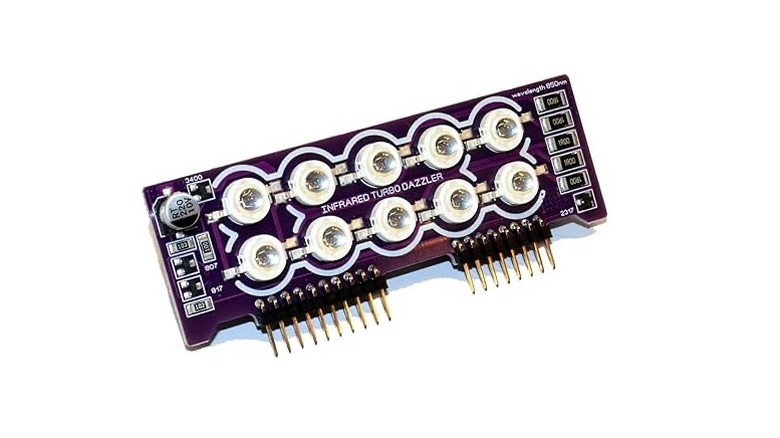
The Flipper Zero has quite comprehensive infrared capabilities. Its built-in transmitter is one of the main reasons people love it, because they can program it to control all their infrared-bound devices. Most home appliances that have a remote — A/Cs, electric fans, and so on — can be learned by the Flipper Zero. So it can be your new universal remote, but for way, way more than just TVs. Just one potential problem: That tiny little infrared transmitter can only transmit about 10 meters, according to Flipper’s community Wiki. With the TURBO Infrared Dazzler Blaster, you can increase that range by an order of magnitude.
By “increase,” we mean up to 200 meters, or about 650 feet if we’re using imperial units. Looking at the thing, it’s not hard to see why. The attachment stacks 10 3W LEDs on the board as if it were a miniature searchlight. The Amazon listing shows a video where the TURBO Dazzler turns a TV off through a store window, perhaps just beyond the Flipper’s effective built-in IR range.
In all honesty, it’s hard to imagine more than a handful of situations where this could be used for strictly innocent, utilitarian reasons; few people need more than a 10-meter range at home or in the workplace. It seems like this is more the sort of thing you’d want if there’s an annoying speaker blasting music in public and you want to surreptitiously turn it off. But we don’t recommend going around turning other people’s personal property on or off, even if the result is ultimately harmless. If you get this thing, check out Flipper-IRDB, a database of pre-configured devices that the TURBO Infrared Dazzler Blaster can control.
5-in-1 protective accessories
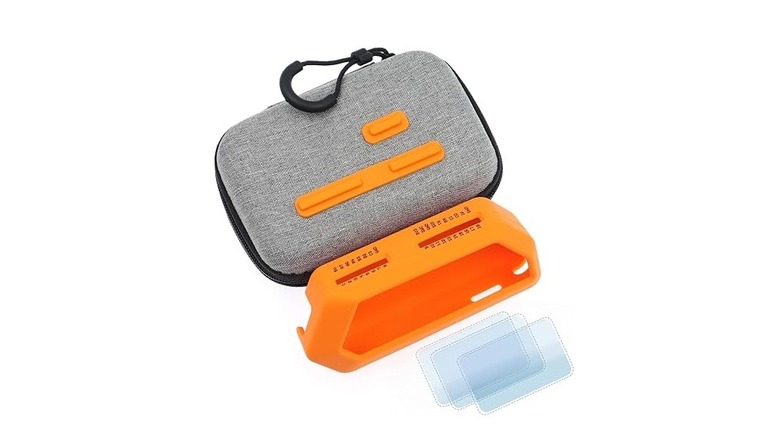
The Flipper Zero certainly feels like a distant relative of those old Nokia cellphones: A hard-plastic device that you could drop down a dozen flights of stairs, pick up, dust off, and then use like nothing happened. But considering this thing retails for $199 and could be quite challenging to get your hands on — especially if the government cracks down further — you probably want to keep it protected. One great all-in-one choice that gets solid reviews is the 5-in-1 protective accessories set from HCJYC Store.
The set seems to include everything you could need or want to ensure your Flipper survives wear and tear: three screen protectors, dust plugs for the GPIO and the SD card, a soft silicone case, and a zippered carrying case. The silicone case includes the GPIO label markings so you don’t have to remove it to install things like the Wi-Fi devboard or the TURBO Blaster. It’s a pretty good deal too at $10, since on the official Flipper Zero website the silicone case costs $15 and the screen protectors cost $7.50. For those who aren’t a fan of the default colors, there is also an all-black set available for the same price.
External CC1101 antenna
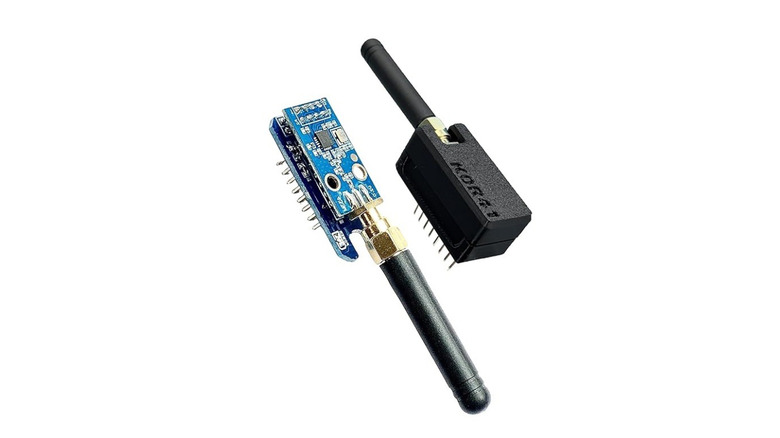
Built into the Flipper Zero is a sub-1 GHz module, Bluetooth LE 5.4, and support for close-range frequencies like RFID and NFC. However, this presents a similar issue to its IR transmitter: These functions generally require close proximity to your target. The sub-1 GHz transmitter, in this case, only reaches 50 meters in range. Luckily, those GPIO pins support add-on antennas that can reach many times farther, like K0R41’s External CC1101 antenna. Once installed, you’ll be able to transmit to a maximum range of 450 feet and receive at an extended range of 15 feet. Notably, these antennas were designed with silicone cases in mind, so if you buy the protective accessories, you won’t have to remove them.
The sub-GHz functions on the Flipper Zero can be used similarly to the Wi-Fi devboard, allowing you to scan and analyze frequencies wherever you go. Specific signals can be copied and then repeated. What practical applications does this have, you might ask? Mostly controlling devices that receive commands over the radio, like an automatic gate outside your home. Similar to the universal remote use case we mentioned earlier, the Flipper could also double as your three-button garage door opener.
If you’re worried that playing around with the Flipper Zero could get you in deep trouble with the government because you accidentally messed with restricted frequencies, don’t worry. The Flipper Zero prevents you from touching them as long as your region is set correctly. Having said that, we should once more beat the same dead horse we’ve been beating this whole time: Don’t use your Flipper Zero’s sub-GHz capabilities for anything illegal. However, there are a ton of legitimate use cases, like using your Flipper to replace a misplaced remote.
GPS module receiver
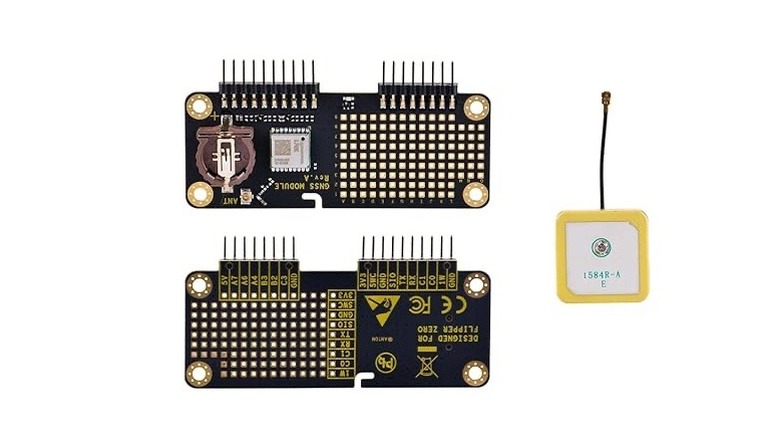
It seems like the Flipper Zero can interact with a wide range of signals, and it goes even further with GPS. You’ll need something like the GNSS module receiver, which supports not just GPS (the U.S. standard), but also foreign systems like BeiDou (China) and GLONASS (Russia). That’s a huge amount of capability added by just around $25. NewHill advertises it as plug-and-play, so this should be a pretty easy one for someone to get working. All you need to do is go to Flipper Lab to install the [NMEA] GPS app, and boom, you’ve got satellite connectivity.
Don’t buy this if you’re expecting to turn your Flipper Zero into an offline map for when you go hiking or something. The GPS capabilities are really just there to feed you basic information that any GPS device can gather from satellites: coordinates, speed, altitude, time, and how many satellites you’re receiving signals from. Perhaps someone with a lot of patience for tinkering could eventually cook up a means of navigating with the Flipper Zero.
Barring that, this seems to be mostly for the nerdy joy of being able to connect to a satellite just because you can. The sensors in your smartphone can already do all of this, but there may be a few edge cases where someone regularly needs to grab coordinates, check altitude, or something in that ballpark, without access to a smartphone or a dedicated mobile GPS device.
Search
RECENT PRESS RELEASES
Related Post