Accelerate agentic application development with a full-stack starter template for Amazon B
February 9, 2026
Generative AI and agentic applications are reshaping how businesses operate—from customer support bots to research assistants—and teams need to move from prototype to production quickly. Last year, AWS released Amazon Bedrock AgentCore—a development platform for building, deploying, and scaling AI agents in production. AgentCore provides core building blocks like runtime hosting, memory, tool integration, and observability with enterprise-grade security and dynamic scaling.
The Fullstack AgentCore Solution Template (FAST) shows you how it works together from the start. It’s a ready-to-deploy starter project that connects AgentCore Runtime, Gateway, Memory, and Code Interpreter with a React frontend and Amazon Cognito authentication—all defined with AWS Cloud Development Kit (AWS CDK). FAST provides a complete reference architecture that shows you how the pieces integrate, with a working chat application that you can learn from and build upon.
In this post, you will learn how to deploy FAST to your Amazon Web Services (AWS) account, understand its architecture, and see how to extend it for your requirements. You will learn how to build your own agent while FAST handles authentication, infrastructure as code (IaC), deployment pipelines, and service integration.
Solution overview
FAST provides a complete full-stack architecture for deploying agents on Amazon Bedrock AgentCore. The template handles authentication, frontend application hosting, agent runtime, memory, observability, and Model Context Protocol (MCP) tool integration by default.
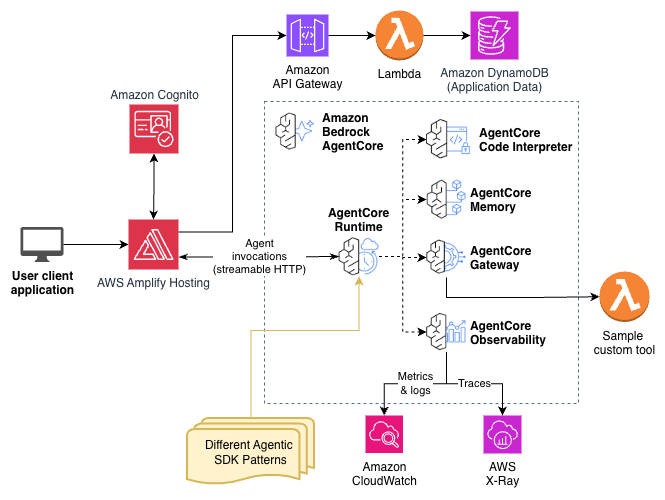
The architecture is centered on Amazon Bedrock AgentCore Runtime, which hosts your agent. In FAST, users authenticate through Amazon Cognito, which secures four integration points:
- User sign-in to the frontend web application on Amazon CloudFront
- Token-based authentication for the frontend to access AgentCore Runtime
- Token-based authentication for agents to access AgentCore Gateway
- Token-based authentication for API requests to Amazon API Gateway
The frontend is a React application that uses Tailwind CSS and shadcn components, hosted on AWS Amplify Hosting. It communicates with AgentCore Runtime using streamable HTTP for real-time response streaming.
The feedback mechanism is provided to demonstrate how to make synchronous and authenticated HTTP calls through API Gateway and store application data in Dynamo DB. AgentCore Runtime connects to several AgentCore capabilities:
- AgentCore Memory – Stores conversation history (short-term) and extracted insights like user preferences (long-term), so your agent remembers context across sessions without custom database work. (FAST includes short-term memory by default, and long-term memory can seamlessly be added with minor modifications.)
- AgentCore Gateway – Exposes APIs as Model Context Protocol (MCP) compatible tools to your agents
- AgentCore Code Interpreter – Executes Python code securely in isolated sandbox environments
- AgentCore Observability – Sends Open Telemetry (OTEL)-compatible metrics and logs to Amazon CloudWatch and traces to AWS X-Ray
The template includes patterns for Strands Agents and LangGraph. FAST and AgentCore are agent framework-agnostic so you can use the agent SDK of your choice. The infrastructure is defined in AWS CDK for repeatable deployments.
The architecture is modular by design. The frontend integrates with the backend powered by AgentCore, which you can use as an example for integrating with your own frontend application. That can be your own React application or a frontend using a completely different frontend framework.
Designed for AI-assisted development
FAST includes extensive documentation by design. The repository includes:
- Steering documents – Rules and conventions that coding assistants follow automatically
- Feature guides – Detailed documentation on gateway, memory, streaming, and other integrations
- READMEs throughout the codebase – Context for each component
When you ask a coding assistant to make changes, it can read these documents and follow the documented patterns. This approach works with many AI coding assistants, including Kiro, Cline, Claude Code, Cursor, and others. The documentation and steering docs are system-agnostic.
AI-assisted development is optional. The same documentation that guides coding assistants is equally useful for developers who prefer to write the code themselves.
Prerequisites
Before deploying FAST, make sure you have the following installed:
The AWS Identity and Access Management (IAM) user that you use must have permissions to make the necessary AWS service calls and manage AWS resources mentioned in this post. When providing permissions to the IAM user, follow the principle of least privilege.
Solution deployment walkthrough
Start by deploying the solution in your local environment.
Step 1: Clone the repository
Start by using the following commands to clone the repository.
Step 2: Configure your deployment
Edit infra-cdk/config.yaml to customize your deployment:
Step 3: Deploy the backend with CDK
Use the following commands to deploy the backend.
This creates the Cognito User Pool, builds and pushes the agent container to Amazon Elastic Container Registry (Amazon ECR), creates the AgentCore Runtime, and sets up the CloudFront distribution. Deployment takes approximately 5–10 minutes.
Step 4: Deploy the frontend
Use the following commands to deploy the frontend.
The script generates the authentication configuration from CDK stack outputs, installs dependencies, builds the React application, and deploys to AWS Amplify Hosting. The script outputs the application URL when complete:
Step 5: Create an Amazon Cognito user
If you provided admin_user_email in the configuration, you will receive an email with temporary credentials that you can use to sign in. Move to the next step.
If you didn’t provide an admin_user_email, create a user manually:
- Open the Amazon Cognito console.
- Find your User Pool (named
stack_name_base-user-pool). - Navigate to Users and choose Create user.
- Enter an email address and temporary password.
- Select Mark email as verified.
- Choose Create user.
Step 6: Access and test the application
You’re ready to access and test the application using the following steps:
- Open the Amplify Hosting URL (printed in your terminal after deploying the frontend) in your browser.
- Sign in with your Amazon Cognito user credentials.
- Change your temporary password when prompted.

The FAST example application is a straightforward multi-turn chat interface. The UI remains minimal by design; it’s built to be replaced with your own frontend or integrated into an existing application. The baseline agent includes two tools to demonstrate the architecture:
- Text analysis tool – An AWS Lambda-based tool behind AgentCore Gateway that counts words and analyzes letter frequency. This demonstrates the Gateway integration pattern.
- Code Interpreter – Direct integration with AgentCore Code Interpreter for more secure Python execution in an isolated sandbox.
Try these sample queries to verify the tools are working:
- “Analyze the text: The quick brown fox jumps over the lazy dog” – The agent should return word count and letter frequency analysis
- “Calculate the first 20 Fibonacci numbers” – Watch the agent write and execute Python code in real time
Along with the UI, the provided tools are also meant to be replaced. They exist to demonstrate two different architectures for adding tools (behind AgentCore Gateway as in the text analysis tool, and directly to the agent as in the code interpreter tool) and give you a working starting point. Additionally, the feedback collection mechanism exists to demonstrate how to make synchronous and authenticated HTTP calls through an API Gateway and can seamlessly be removed or repurposed.
Customize the application to your needs
What if you need a document analysis agent instead of a chatbot? Or you want to integrate with your company’s existing identity provider? FAST handles exactly this; the baseline application is a starting point, not a constraint.
The following is a recording of a live stream on the AWS Events YouTube channel in which FAST is used to build an agentic personal assistant application in real time.
Changing the agent pattern
The template includes two agent patterns in the patterns/ directory:
- strands-single-agent – A basic conversational agent using the Strands framework with MCP tool integration
- langgraph-single-agent – A basic conversational agent using the LangGraph with MCP tool integration
To switch patterns, update backend.pattern in infra-cdk/config.yaml and redeploy with cdk deploy.
To create your own pattern, add a new directory under patterns/ with your agent implementation, a requirements.txt file, and a Dockerfile. Update the configuration to point to your new pattern.
Adding new tools using Gateway
AgentCore Gateway routes tool calls to an AWS Lambda function. To add a new tool:
- Create a Lambda function that implements your tool logic.
- Define the tool schema (name, description, and input parameters) in the CDK stack.
- Add the Lambda function as an AgentCore Gateway target.
- Redeploy with
cdk deploy.
The agent automatically discovers tools from Gateway through MCP. See docs/GATEWAY.md for implementation details and examples.
Using Code Interpreter
Code Interpreter is already integrated in the baseline agent. It provides more secure Python execution in isolated sandbox environments with session persistence. Users can ask the agent to run calculations, generate data, or execute arbitrary Python code.
Modifying the frontend
The frontend is a standard React application in the frontend/ directory. AI coding assistants like Kiro are skilled at modifying React frontends. Describe the changes you want and let the assistant implement them.
After making changes, redeploy with python scripts/deploy-frontend.py
Because FAST is using AWS Amplify Hosting, you have the option of integrating with a supported version control system to take advantage of the built-in continuous integration and delivery (CI/CD) capabilities of Amplify Hosting, which can replace the provided deploy-frontend.py script.
Beyond chat: Other use cases
The baseline application centers around a chat interface, but FAST supports many agentic use cases. For example, a document analysis agent might add a file upload component to the frontend, a Lambda tool that extracts text from PDFs, and agent logic that summarizes findings. Or a workflow automation agent might monitor Slack channels and automatically create Jira tickets from support requests. The same architecture applies, you’re only swapping the pieces. These customizations work within the default architecture of FAST. But what if you need to replace a core component entirely?
Flexibility: swap out major components
The architecture is intentionally modular, so you can replace major components as your requirements evolve. Here are some examples:
- Identity provider – Replace Amazon Cognito with Okta, Microsoft Entra ID, Auth0, or your existing OAuth 2.0-compatible identity system
- Frontend framework – Swap the React frontend for Vue, Angular, or integrate the agent backend into an existing application
- Hosting – Move from AWS Amplify Hosting to Vercel, Netlify, a self-managed CloudFront distribution, or your preferred hosting solution
- Agent framework – Use Strands Agents, LangGraph, CrewAI, or an agent SDK even in other languages like TypeScript or Java
These are some of the flexibility points FAST offers. The modular CDK infrastructure and decoupled architecture make it straightforward to adapt the template to your specific needs.
Clean up
Use the following commands to remove the resources created by FAST:
cd infra-cdk
cdk destroy --force
This deletes the AWS resources including Amazon Simple Storage Service (Amazon S3) buckets and Amazon Elastic Container Registry (Amazon ECR) images. If you leave resources running, you might incur charges for some running resources. Note that Amazon Bedrock AgentCore is pay per use.
Conclusion
FAST helps reduce the time to build and deploy an agent application to under 30 minutes. You can get more secure authentication, a working frontend, and integrated AgentCore capabilities—Memory, Gateway, Code Interpreter, and Observability—without writing infrastructure code from scratch. The baseline chat application and sample tools are starting points, not constraints. Swap in your own agent logic, connect your tools, modify the frontend, or replace major components like the identity provider or hosting solution. The modular architecture adapts to your requirements.
To get started, star and clone the repository, deploy FAST to your AWS account, and have a working agent application running in under 30 minutes. From there, customize and ship something real.
For expert assistance, the AWS Generative AI Innovation Center, AWS Professional Services, and our AWS Partners are here to help.
About the authors
Search
RECENT PRESS RELEASES
Related Post