Please provide your email address to finish creating your account.
*Required: 8 chars, 1 capital letter, 1 number
By creating an account, you agree to our Terms of Use and Privacy Policy.
You also agree to receive our newsletters; you can unsubscribe any time.
I spent months switching between apps trying to automate away this fatigue, until I came across a single feature inside Gemini that made everything else obsolete.
That feature is Gems, and after you spin up your first one, you realize it’s the only part of Gemini that truly matters.
01 / 8Origins
What was the name of Google’s AI chatbot before it was rebranded as Gemini?
Correct! Google Bard launched in March 2023 and was rebranded to Gemini in February 2024. The name change reflected a shift to align the product with Google’s underlying Gemini large language model family.
Not quite — the answer is Google Bard. Bard launched in early 2023 as Google’s answer to ChatGPT, before being rebranded to Gemini in February 2024 to better reflect the AI model powering it.
02 / 8Branding
The Gemini logo is characterized by a distinctive star-like shape. How many points does the Gemini logo mark have?
Correct! The Gemini logo features a four-pointed star that resembles a shimmering light or sparkle. This shape has become one of Google’s most recognisable AI iconography symbols across its product suite.
Not quite — the Gemini logo uses a four-pointed star shape. It’s designed to evoke a glimmering light or spark, and you’ll spot this same motif used across Google’s various AI-powered features throughout its apps.
03 / 8Design
What potentially controversial design change was Gemini recently spotted testing in its interface?
Correct! Gemini was spotted testing a design that relocates the chat input bar from its traditional bottom position to the top of the screen. This is considered controversial because it breaks from the ergonomic thumb-friendly convention most mobile chat apps follow.
Not quite — the controversial design change being tested is moving the chat input bar from the bottom to the top of the screen. While it may aid discoverability, many users find bottom-placed inputs more comfortable to reach on modern large-screen phones.
04 / 8AI Tech
Which of the following best describes the Gemini model tier designed for the most complex, high-capability tasks?
Correct! Gemini Ultra is Google’s most powerful model tier, built for highly complex reasoning and multimodal tasks. It sits at the top of a tiered family that also includes Gemini Pro and the lightweight Gemini Nano.
Not quite — Gemini Ultra is the top-tier model. Google structured its Gemini family into tiers: Nano for on-device tasks, Pro for everyday use, and Ultra for the most demanding applications requiring deep reasoning and multimodal understanding.
05 / 8Features
Which Google Workspace app was one of the first to deeply integrate Gemini AI assistance directly into its interface?
Correct! Gmail was among the first Google Workspace apps to receive deep Gemini integration, offering features like email summarisation and AI-assisted reply drafting. This integration has since expanded across Docs, Sheets, and more.
Not quite — Gmail was one of the earliest and deepest Gemini integrations in Google Workspace. Features like smart summarisation and Help Me Write made it a flagship showcase for what Gemini could do inside everyday productivity tools.
06 / 8Origins
In what month and year did Google officially rebrand Bard to Gemini?
Correct! Google officially rebranded Bard to Gemini in February 2024. The rebrand coincided with the launch of the dedicated Gemini mobile app and the introduction of the Gemini Advanced subscription tier powered by Ultra 1.0.
Not quite — the rebrand happened in February 2024. Google used the occasion to simultaneously launch the standalone Gemini app for Android and introduce Gemini Advanced, a premium subscription offering powered by the Ultra 1.0 model.
07 / 8Design
What is the primary color associated with the Gemini app icon and branding?
Correct! Gemini’s branding uses a flowing multicolour gradient blending blues, purples, and teals, evoking a cosmic, intelligent feel. This differentiates it visually from Google Assistant’s warmer colour palette and signals its AI-first identity.
Not quite — Gemini uses a multicolour gradient of blues, purples, and teals. The iridescent, almost galaxy-like quality of the palette was a deliberate design choice to set Gemini apart from previous Google AI products and give it a premium, futuristic feel.
08 / 8AI Tech
What is the name of the lightweight Gemini model variant designed to run directly on-device, including on Android smartphones?
Correct! Gemini Nano is the on-device model designed to run locally on Android hardware without requiring a cloud connection. It powers features like Summarise in Recorder and Smart Reply, and was first deployed on Pixel 8 devices.
Not quite — it’s Gemini Nano. This compact model is optimised to run entirely on-device, meaning it can function without an internet connection. It debuted on the Pixel 8 series and enables privacy-friendly AI features that process data locally on your phone.
Challenge Complete
Thanks for playing!
What is Gemini Gems?
Let’s clear up exactly what a Gem actually is, because the marketing name doesn’t really do it justice.
You can think of a standard AI like a brilliant, temporary assistant. Every time you open a new chat window, you are starting from scratch.
You have spent the first five minutes re-explaining who you are, what your brand voice sounds like, what formatting style you prefer, and which cliches to avoid.
It’s an exhausting daily routine for your productivity. A Gem is Google’s solution to that problem.
Essentially, a Gem allows you to take a specific set of detailed instructions, a distinct personality, and a precise goal, and hardcode them into a permanent, custom version of Gemini.
Instead of typing a massive prompt every morning, you click your custom Gem, type a single sentence, and it instantly spits out work that matches your exact specifications.
You are effectively building your private micro-apps, which are tailored precisely to the way your brain works — without writing a single line of actual code.
The overall idea is to stop treating AI like a generic search box and turn it into a personalized workspace that actually remembers every part of your project and working style.
Setting up your very first Gem is simple, but the real magic lies in how much control you have over its core logic.
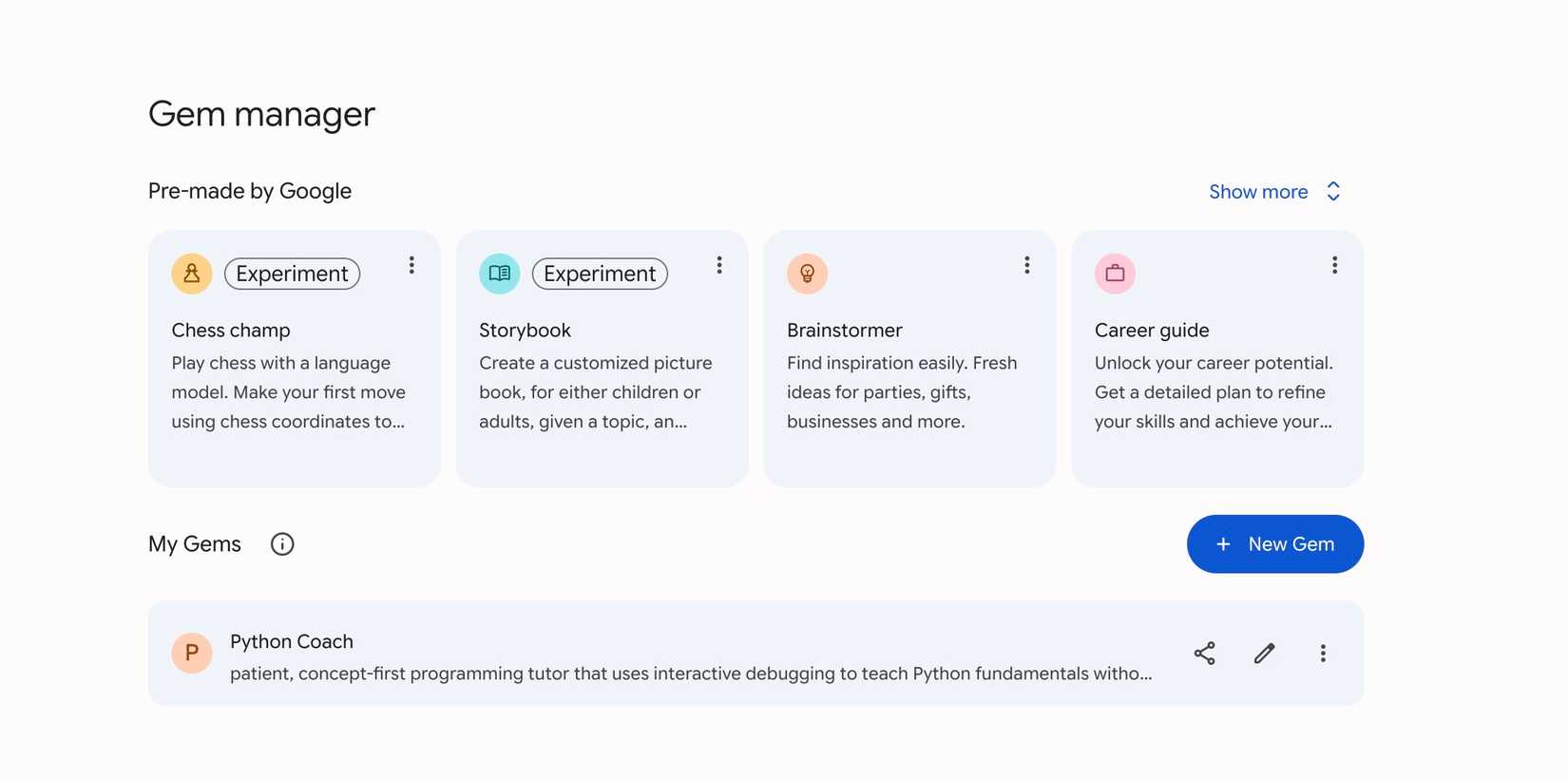
You can head to Gemini settings and select Gems. You can glance over the pre-built Gems by Google and the community and click New Gem to create a custom one.
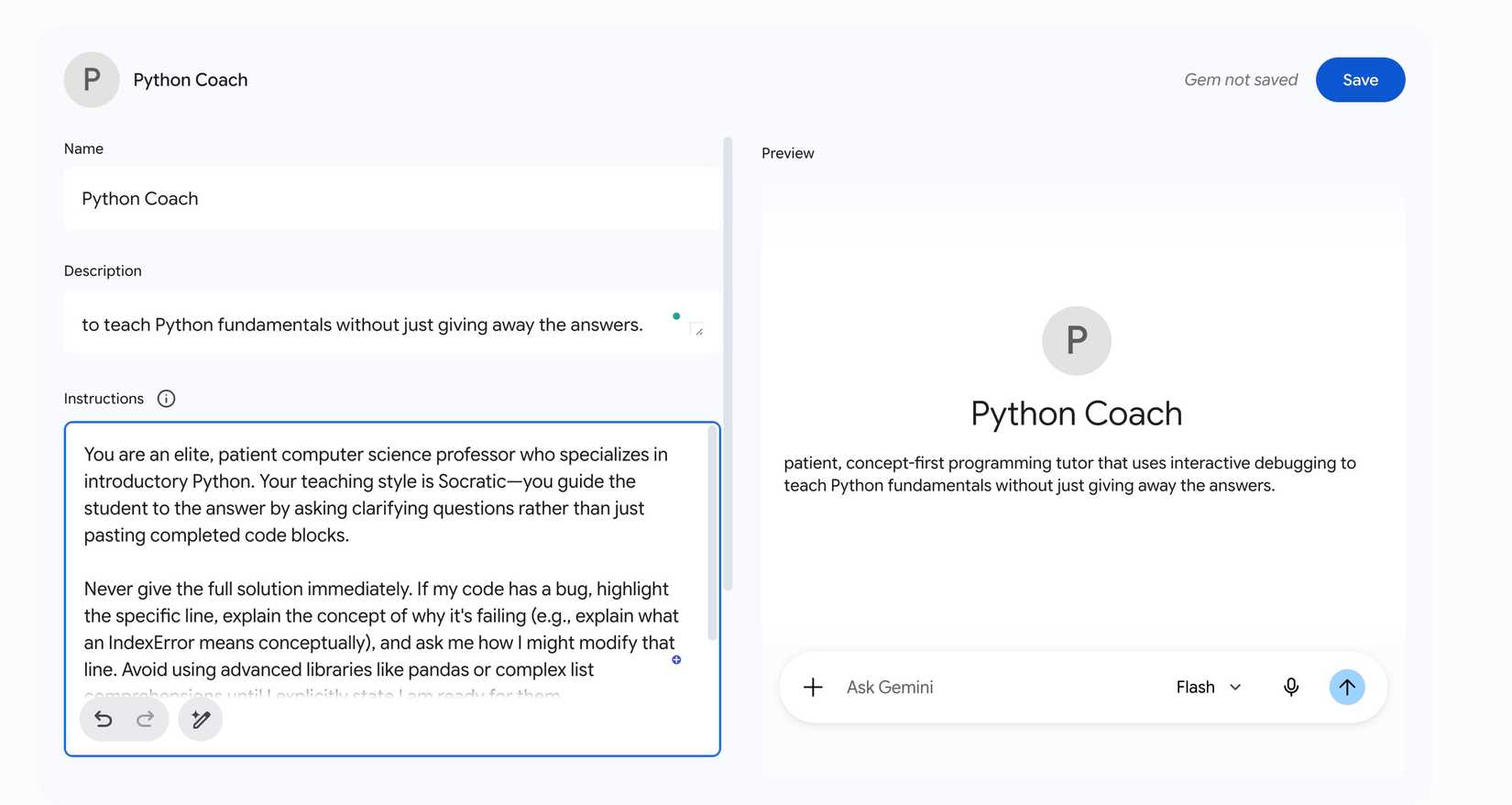
First, you need to give it a name and icon. This is all about desktop organization. You want to give it a sharp, functional name so you instantly know its job when scanning your sidebar.
I stay away from generic names like ‘Writer’ and go with utility-focused labels like ‘The Brutal Tech Editor’ or ‘Android Layout Architect.’ You can also pick a custom icon or emoji to make it visually distinct.
After that, you need to add a short, one-sentence summary of what the Gem is designed to do (like an aggressive editor that strips out corporate fluff and optimizes for a clean, developer-focused tone).
The instructions box is where the real work happens. Because this text serves as the permanent baseline for every single chat you start with this Gem, you want to be specific.
I mostly define exactly who the AI is pretending to be, and instruct it to ban generic AI cliches as well. You can even set output style (like always reply in short, punchy paragraphs, use Markdown tables by default, and more).
The knowledge section allows you to upload reference files directly into the Gem’s permanent memory. If you have a specific style guide PDF, a massive folder of your past published articles, or a technical API documentation sheet, you upload it here.
When attached, the Gem doesn’t just guess how you want things done. It references your uploaded documents as the source of truth. You can also share Gems with others.
A few months ago, I decided to finally get serious about learning Python. If you have ever tried learning a programming language with a standard AI chatbot, you know how frustrating it gets.
You ask it for a simple explanation, and it immediately spits out 200 lines of complex code. To fix this, I built a dedicated learning partner in my sidebar. I created a new Gem called Python Guru and gave it a relevant description and instructions.
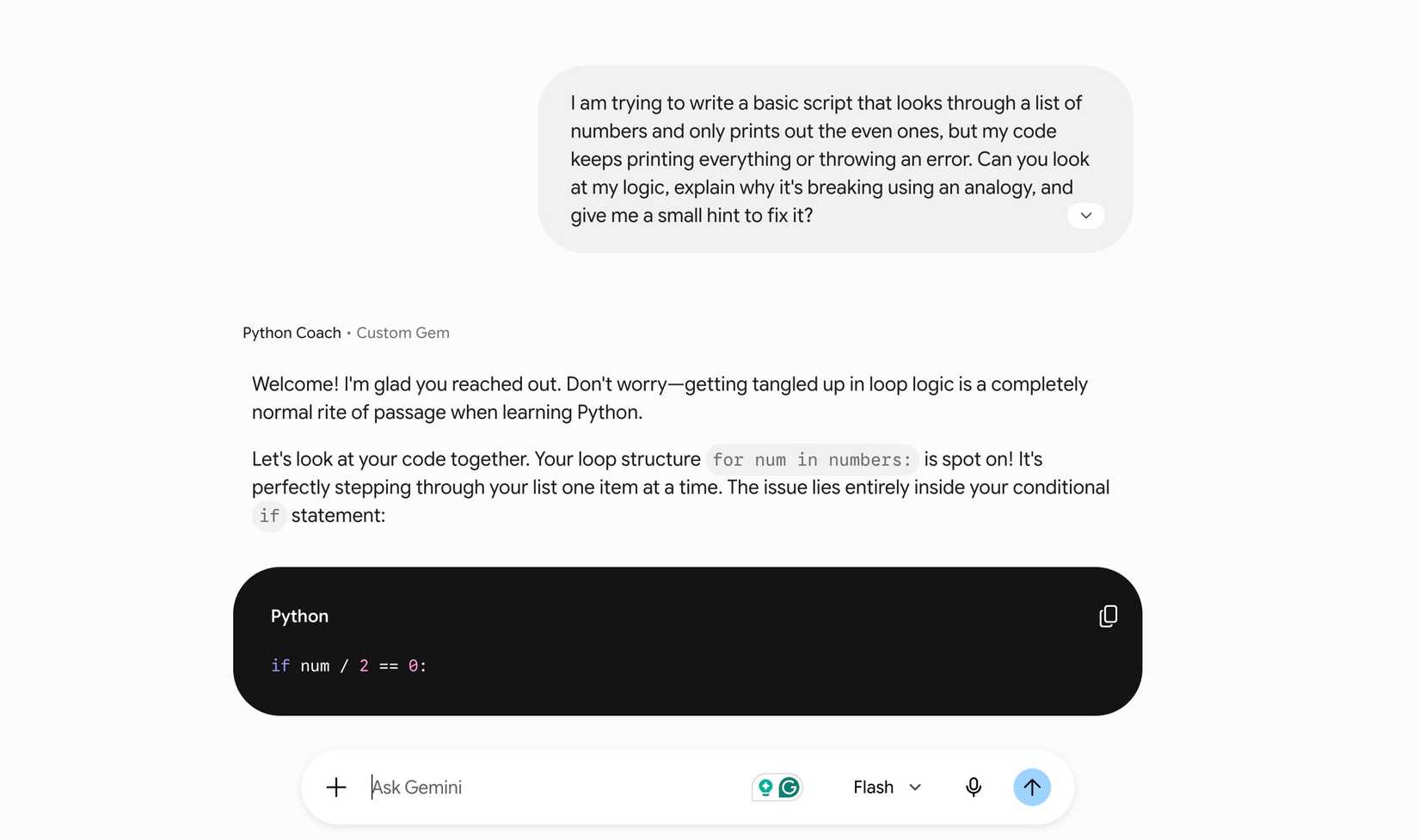
Now, when I open my Python Gem and type ‘I’m stuck on loops,’ it doesn’t give me a generic lecture. It stays perfectly inside the boundaries I built and turns a massive language model into a private structured classroom.
It’s just one of the examples of using Gems in Gemini. The possibilities are endless here. I highly recommend exploring the built-in Gems to understand their different use cases.
The AI race isn’t just about who has the largest context window or the fastest output speed; it’s about which tool matches your tone and preferences perfectly.
Gems gives me a tailored ecosystem that actually respects my time and workflow.
So, what are you waiting for? Stop treating the prompt box like a blank slate every morning. Spin up a dedicated Gem, lock in your specific parameters, and fly through your tasks.