Managing Amazon OpenSearch UI infrastructure as code with AWS CDK
January 23, 2026
As organizations scale their observability and analytics capabilities across multiple AWS Regions and environments, maintaining consistent dashboards becomes increasingly complex. Teams often spend hours manually recreating dashboards, creating workspaces, linking data sources, and validating configurations across deployments—a repetitive and error-prone process that slows down operational visibility.
The next generation OpenSearch UI in Amazon OpenSearch Service introduces a unified, managed analytics experience that decouples from individual OpenSearch domains and OpenSearch collections. It provides workspaces, dedicated team spaces with collaborator management and a tailored environment for observability, search, and security analytics use cases. Each workspace can connect to multiple data sources, including OpenSearch Service domains, Amazon OpenSearch Serverless collections, and external sources such as Amazon Simple Storage Service (Amazon S3). OpenSearch UI also supports access with AWS IAM Identity Center, AWS Identity and Access Management (IAM), Identity provider (IdP)-initiated single sign-on (SAML using IAM federation), and AI-powered insights.)-initiated single sign-on (SAML using IAM federation),and AI-powered insights.
In this post, you’ll learn how to use the AWS Cloud Development Kit (AWS CDK) to deploy an OpenSearch UI application and integrate it with an AWS Lambda function that automatically creates workspaces and dashboards using the OpenSearch Dashboards Saved Objects APIs. Using this automation means that environments launch with ready-to-use analytics that are standardized, version-controlled, and consistent across deployments. that are standardized, version-controlled, and consistent across deployments.
Specifically, you’ll learn how to:
- Deploy an OpenSearch UI application using AWS CDK that in turn uses AWS CloudFormation
- Automatically create workspaces and dashboards using a Lambda based custom resource
- Generate and ingest sample data for immediate visualization
- Build visualizations programmatically using the OpenSearch Dashboards Saved Objects API
- Authenticate API requests using AWS Signature Version 4
All the code samples in this post are available in this AWS Samples repository.
Solution overview
The following architecture demonstrates how to automate OpenSearch UI workspace and dashboard creation using AWS CDK, AWS Lambda, and the OpenSearch UI APIs.
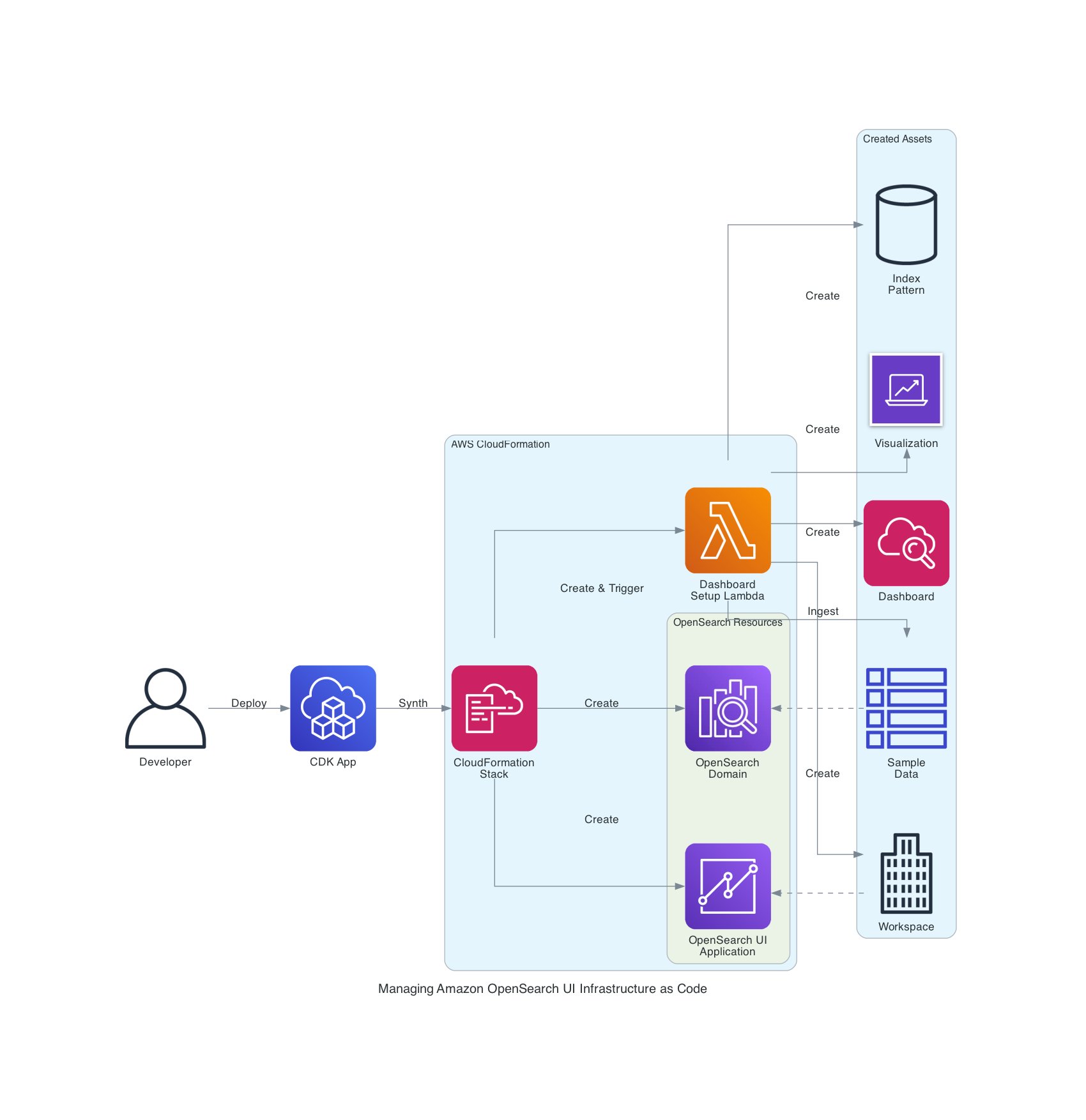
The workflow flows from left to right:
- Deploy stack – Developer runs
cdk deployto launch the infrastructure and create the CloudFormation stack. - Create domain – CloudFormation creates the OpenSearch domain (which serves as the data source)
- Create OpenSearch UI app – CloudFormation creates the OpenSearch UI application
- Trigger Lambda – CloudFormation invokes the Lambda function as a custom resource
- Generate and ingest data – Lambda generates sample metrics and ingests them into the domain
- Create workspaces and assets using saved object API – Lambda creates the workspace, index pattern, visualization (pie chart), and dashboard using OpenSearch UI API calls
The result is a fully configured OpenSearch UI with sample data and a ready-to-use dashboard automated through infrastructure as code (IaC). The same workflow can also be integrated into existing infrastructure for OpenSearch UI applications to automatically create or update dashboards during future deployments, maintaining consistency across environments. consistency across environments.
Prerequisites
To perform the solution, you need the following prerequisites:
- An AWS user or role with sufficient permissions – You’ll need permissions to create and manage AWS resources such as OpenSearch Service domains, OpenSearch UI applications, Lambda functions, IAM roles and policies, virtual private cloud (VPC) networking components (subnets and security groups), and CloudFormation stacks. For testing or proof-of-concept deployments, we recommend using an administrative role. For production, follow the principle of least privilege.
- Install development tools:
- AWS CLI v2.x or later. Visit Getting started with the AWS CLI for more information.
- Node.js 18.x or later.
- AWS CDK v2.110.0 or later:
npm install -g aws-cdk. - Python 3.11 or later.
- Bootstrap CDK – This is a one-time setup per account or Region:
This creates the necessary S3 bucket and IAM roles for AWS CDK deployments in your account.
Get the sample code
Clone the sample implementation from GitHub:
The repository contains:
This sample demonstrates how to deploy an OpenSearch UI application, create a workspace, ingest sample data, and automatically generate visualizations and dashboards using IaC.
After cloning the repository, you can deploy the stack to automatically create your first OpenSearch workspace and dashboard with sample data.
Understanding the solution
Before deploying, let’s examine how the solution works. The following steps explain the architecture and automation logic that will execute automatically when you deploy the AWS CDK stack. The next section contains the actual deployment commands you’ll run.
Provision OpenSearch UI resources
The AWS CDK integrates seamlessly with AWS CloudFormation. This means you can define your OpenSearch resources and automation workflows as IaC. In this solution, AWS CDK provisions the OpenSearch domain, OpenSearch UI application, and a Lambda based custom resource that performs the automation logic.
When deploying OpenSearch UI automation, the order of resource creation is important to correctly resolve dependencies. The recommended order is as follows:
- Create the Lambda execution role – Required for access to AppConfigs and APIs
- Create the OpenSearch domain – Serves as the primary data source
- Create the OpenSearch UI application – References the Lambda role in its AppConfigs
- Create the Lambda function – Defines the automation logic
- Create the custom resource – Triggers the Lambda automation during stack deployment
The following code snippet (from cdk/lib/dashboard-stack.ts) shows the key infrastructure definitions:
These are some important implementation notes:
- The Lambda role must be created before the OpenSearch UI application so its Amazon Resource Name (ARN) can be referenced in
dashboardAdmin.groups - The Lambda role includes both
opensearch:ApplicationAccessAll(for OpenSearch UI API access) andes:ESHttp*permissions (for ingesting data into the OpenSearch domain) - The custom resource enables the automation function to run during deployment, passing both OpenSearch UI and OpenSearch domain endpoints as parameters
Authenticate with OpenSearch UI APIs
When programmatically interacting with the OpenSearch UI (Dashboards) APIs, proper authentication is required so your Lambda function or automation script can securely access the APIs. The OpenSearch UI uses AWS Signature Version 4 (SigV4) authentication—similar to the OpenSearch domain APIs—but with a few important distinctions.
When signing OpenSearch UI API requests, the service name must be opensearch, not es. This is a common source of confusion: the OpenSearch domain endpoint still uses the legacy service name es, but the OpenSearch UI endpoints require opensearch. Using the wrong service name will cause your requests to fail authentication, even if the credentials are valid.
For POST, PUT, or DELETE requests, include the following headers to satisfy the OpenSearch UI API security requirements:
| Header | Description | |
| 1 | Content-Type | Set to application/json for JSON payloads |
| 2 | osd-xsrf | Required for state-changing operations (set to true) |
| 3 | x-amz-content-sha256 | SHA-256 hash of the request body to ensure data integrity |
The SigV4 signing process automatically computes this body hash when using the botocore AWSRequest object, maintaining request integrity and preventing tampering during transmission.
The following code snippet (from lambda/sigv4_signer.py) demonstrates how to sign and send a request to the OpenSearch UI API:
This utility function signs the request using the correct service name (opensearch), attaches the required headers, and sends it securely to the OpenSearch UI endpoint.
Create workspace and dashboard with sample data
The Lambda function (lambda/dashboard_automation.py) automates the entire process of provisioning a workspace, generating sample data, and creating visualizations and dashboards through the OpenSearch UI APIs. Visit the following lists of APIs:
Follow these steps:
- Locate or create a workspace. Each dashboard in the OpenSearch UI must exist within a workspace. The function first checks whether a workspace already exists and creates one if necessary. The workspace associates one or more data sources (for example, an OpenSearch domain or OpenSearch Serverless collection):
This logic enables repeated deployments to remain idempotent; the Lambda function reuses existing workspaces rather than creating duplicates.
- Generate and ingest sample data. To make the dashboards meaningful upon first launch, the Lambda function generates a small dataset simulating HTTP request metrics and ingests it into the OpenSearch domain using the Bulk API:
The function then ingests this data into the domain:
This enables each deployment to include sample analytics data that immediately populates the dashboard upon first login.
- Create a visualization. After the index pattern is available, the Lambda function creates a pie chart visualization that shows HTTP status code distribution:
This visualization will later be embedded inside a dashboard panel.
- Create the dashboard. Finally, the Lambda function creates a dashboard that references the visualization created in the previous step:
This completes the dashboard creation process, providing users with an interactive visualization of application metrics as soon as they access the workspace.
The full implementation, including logging, error handling, and helper utilities, is available in the AWS Samples GitHub repository.
Deploy the infrastructure with AWS CDK
With the AWS CDK stack and Lambda automation in place, you’re ready to deploy the full solution and verify that your OpenSearch UI dashboard is created automatically.
Deploy the stack
From the root directory of the cloned repository, navigate to the AWS CDK folder and deploy the stack using your IAM user ARN from the Prerequisites section:
The deployment process typically takes 20–25 minutes because AWS CDK provisions the OpenSearch domain, OpenSearch UI application, Lambda function, and custom resource that runs the automation.
Verify the deployment
After the deployment completes:
- Open the OpenSearch UI endpoint displayed in the AWS CDK output.
- Sign in using your IAM credentials.
- Switch to the newly created
workspace-demoworkspace. - Open the Application Metrics dashboard.
- View the pie chart visualization that displays the distribution of HTTP status codes from the sample data.
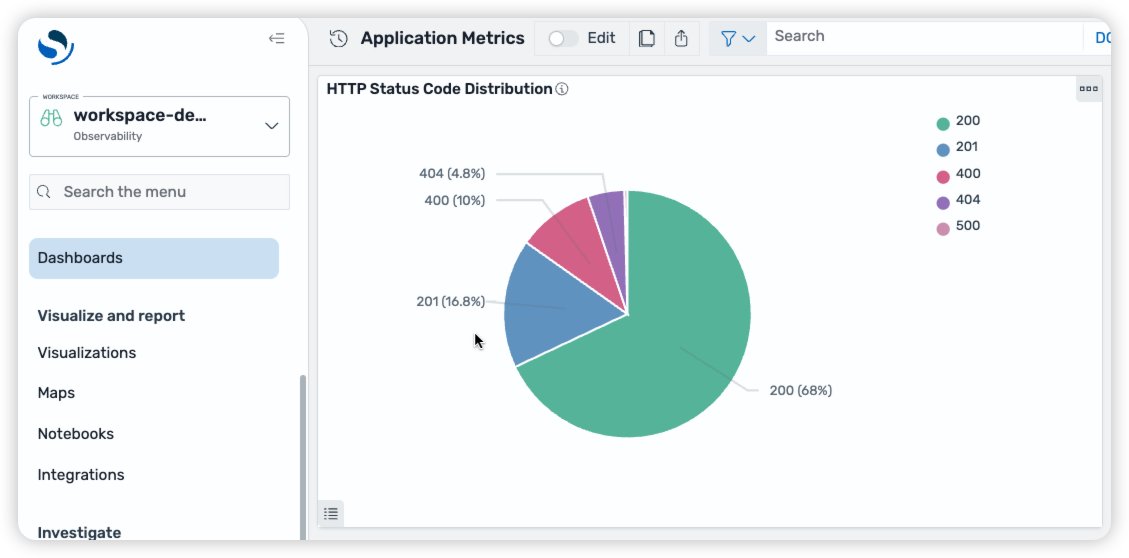
The dashboard automatically displays a pie chart visualization populated with synthetic application metrics, demonstrating how the Saved Objects API can be used to bootstrap meaningful analytics dashboards immediately after deployment.
Enhancement 1: Simplify dashboard creation with Saved Object Import API
As your OpenSearch Dashboards evolve, managing complex dependencies between index patterns, visualizations, and dashboards can become increasingly difficult. Each dashboard often references multiple saved objects, and manually recreating or syncing them across environments can be time-consuming and error prone.
To simplify this process, we recommend using the Saved Objects Import/Export API. You can use this API to bundle entire dashboards, including their dependent objects, into a single transferable artifact. By using this approach, you can version, migrate, and deploy dashboards across environments as part of your CI/CD workflow, maintaining consistency and reducing operational overhead.
Export your dashboard
You can export dashboards directly from the OpenSearch UI or use saved object export API:
- Open Stack Management and then Saved Objects
- Select the dashboard and related objects (for example, visualizations and index patterns)
- Choose Export
- Save the exported file as
dashboard.ndjson
This file contains saved objects serialized in newline-delimited JSON (NDJSON) format, ready for versioning or deployment automation.
Import dashboards programmatically
You can programmatically import the NDJSON file into a target workspace using the Saved Objects import API:
By using this approach, you can treat dashboards as deployable assets, exactly like application code. You can store your exported dashboards in source control, integrate them into your AWS CDK or CloudFormation pipelines, and automatically deploy them to multiple environments with confidence.
Enhancement 2: Improved security configurations
In some cases, you might want to improve the security configuration of your OpenSearch UI application, or you might be dealing with OpenSearch domains that have been deployed with additional security configurations. In this section, we discuss how you can improve the security configuration of your OpenSearch UI application and still achieve IaC with AWS CDK. More specifically, we explain how you can set up your OpenSearch UI application when your OpenSearch domain is in a VPC and when fine-grained access control is enabled.
When the OpenSearch Domain resides within a VPC, additional configurations will be needed to properly connect with your dashboard.
Enable communication between Lambda functions used to ingest data and the OpenSearch domain in the VPC
When the OpenSearch Service domain resides in a VPC, the Lambda functions that ingest data into the domain must be able to communicate with it. The most straightforward way of doing this is to allow the Lambda function to be executed within the same VPC as your OpenSearch Service domain and give it the same security group. An example is provided in the GitHub repository.
- Allow HTTPS communications from clients trying to communicate with your OpenSearch Service domain. In this example, the client will be using the same security group used in the OpenSearch Service domain:
- Add this managed policy to the role assumed by the Lambda function to allow it access to the VPC:
- Specify the VPC and the security group your Lambda function will be using. In this case, the VPC is the same one used by your OpenSearch Service domain:
Authorize OpenSearch UI service for VPC endpoint access
For the OpenSearch Service domain to be accessible to your dashboard, VPC endpoint access must be enabled. This can be achieved by using a custom resource, as shown in the following configuration:
Enable fine-grained access control
When you use fine-grained access control in combination with an OpenSearch UI, you have more control over which operations are allowed for each user. This can be especially useful when you want to limit your users’ actions beyond the admin, read, or write permissions that come with OpenSearch UI. Unique roles can be created and mapped to one or more users to achieve precise control over who can access what functionality.
In the previous sections, the same Lambda was used to make requests to both the OpenSearch Service domain and the OpenSearch UI. However, in situations where the main role isn’t the same between the OpenSearch Service domain and the OpenSearch UI, we recommend creating a Lambda function for each role. Again, when deploying OpenSearch UI automation, the order of resource creation is important to correctly resolve dependencies. As illustrated previously, the recommended order is as follows:
- Create the dashboard Lambda execution role – Required for access to AppConfigs and APIs
- Create the OpenSearch domain main role – Required for domain creation and APIs
- Create the OpenSearch domain – Serves as the primary data source
- Create the OpenSearch domain Lambda function – Defines the automation logic for the OpenSearch domain
- Create the OpenSearch domain custom resources – Triggers the Lambda automation during stack deployment
- Create the OpenSearch UI application – References the Lambda role in its AppConfigs
- Create the OpenSearch UI Lambda function – Defines the automation logic for the OpenSearch UI
- Create the OpenSearch UI custom resource – Triggers the Lambda automation during stack deployment
When creating the OpenSearch Service domain, specify the fine-grained access control parameter, as follows:
The Lambda function responsible for communicating with the OpenSearch Service domain should have the necessary permissions to write to it. The following is a configuration example where the Lambda function assumes the domain’s main role:
Then, add the custom resources to create the roles and role mappings, as needed:
Create additional roles in the OpenSearch Service domain (Optional)
If you want to grant specific permissions to some users, we recommend creating roles for them. This can be achieved by making the following requests to the OpenSearch Service domain endpoint.
For more information about the roles endpoint, review the Create role in the OpenSearch documentation.
Create role mappings in the OpenSearch domain for your dashboard users (Optional)
Users can be mapped to one or more roles to control their access to the OpenSearch Service domain, which will be reflected in the OpenSearch UI dashboard connected to the domain.
For more information about the rolesmapping endpoint, review the Create role mapping in the OpenSearch documentation.
These are some important implementation notes:
- By default, the OpenSearch Domain will create a role mapping for its main user, under
all_accessandsecurity_manager. If you modify those mappings, we recommend keeping the main user in the list to prevent accidental loss of access. - When fine-grained access control is used, if a user opens the OpenSearch UI without being mapped to a role in the OpenSearch Domain, they will be unable to visualize or modify the data located in the OpenSearch Domain, even if they’re part of the OpenSearch UI’s admin group. For this reason, we recommend creating custom resources to add the appropriate role mappings. OpenSearch UI admins will still be able to make changes to the OpenSearch UI dashboards.
- When programmatically interacting with the OpenSearch Domain APIs, proper authentication is required so your Lambda function or automation script can securely access the APIs. The OpenSearch Domain uses SigV4 authentication. When signing the OpenSearch Domain API requests, the service name must be
es.
Cost considerations
This solution uses several AWS services, each with its own cost component:
- Amazon OpenSearch Service – This is the main cost driver. Charges are based on instance type, number of nodes, and Amazon Elastic Block Store (Amazon EBS) storage. For testing, you can use a smaller instance (for example,
t3.small.search) or delete the domain after use to minimize cost.) or delete the domain after use to minimize cost. - AWS Lambda – The automation function runs only during deployment and incurs minimal charges for a few short invocations.
- AWS CDK and CloudFormation – Create temporary IAM roles and Amazon S3 deployment assets with negligible cost.
For pricing details, refer to Amazon OpenSearch Service Pricing.
Clean Up
To avoid incurring ongoing costs, clean up the resources created by this solution when you’ve completed your testing.Open your project directory and destroy the AWS CDK stack:
This command removes the resources provisioned by the AWS CDK stack, including:
- The Amazon OpenSearch Service domain
- The OpenSearch UI application
- The AWS Lambda function and custom resource
- IAM roles and policies associated with the deployment
By cleaning up, you stop the related charges and maintain a tidy, cost-efficient AWS environment.
Additional resources
Conclusion
By integrating the Saved Objects API with the next-generation Amazon OpenSearch UI, you can programmatically create entire analytics experiences—including workspaces, sample data, visualizations, and dashboards—directly from your IaC.
This approach brings the power of IaC to your analytics layer. Using AWS CDK and AWS Lambda, you can version, deploy, and update dashboards consistently across environments, reducing manual setup while improving reliability and governance. With this automation in place, your teams can focus on insights rather than setup—delivering observability-as-code that scales with your organization.
About the authors
Search
RECENT PRESS RELEASES
Related Post